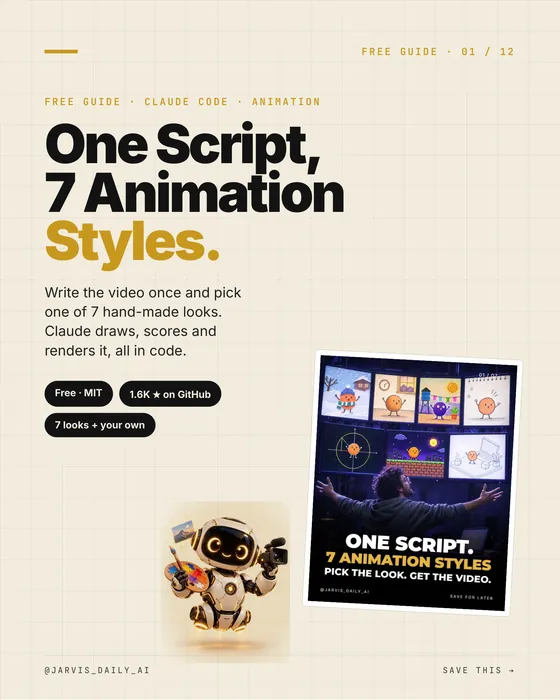
One Script, 7 Animation Styles
Write the video once. Pick the look.
You get this PDF right away, plus one email a week with the new guide. Unsubscribe in one click. Privacy
The problem
Animated explainers usually mean hiring an animator, learning an editor, or using an AI video model that changes the style every clip. Trying a second look means starting over.
After this guide
You'll have a free Claude Code skill installed, one script you can reuse, and a short MP4 rendered on your own machine. Change the last words and the same story is redrawn in another of the seven styles, or in a look matched from your own references.
What's inside
- The install in one message, as a plugin or by hand, and what it needs
- One fill-in script and the last words that swap the style
- All 7 looks with real frames, what each suits and a prompt for each
- Your own look from references, plus voice, music and every format
Free preview
This is a free guide to a Claude Code skill that turns one short script into an animated video. Every frame is drawn and every note of the music is written in code, then rendered to MP4 on your own computer with a headless browser and ffmpeg. You write the script once and change only the style words at the end to get a different hand-made look.
- Check what it needsNode 18 or newer, ffmpeg on your PATH, and Playwright with Chromium (npm i -g playwright, then npx playwright install chromium). The skill checks these first and stops if one is missing. No video editor or AI video model is needed.
- Install the skill onceAdd it as a Claude Code plugin, paste its GitHub link into Claude Code and ask it to copy the skill into ~/.claude/skills/animate, or clone it there by hand. Restart Claude Code and type /animate.
- Write the one scriptOpen Claude Code in the folder you want the video in. Give it the topic, the one thing to get across, four beats, the format and a style.
- Approve three check-insIt asks up to 8 questions, then shows the story as a beat table, 2 to 4 full-size frames of the look, and a storyboard. A thumbs up on each, and it builds and renders pieces/[name]/renders/share.mp4.
- Swap the style wordsAsk for the same script in another look. Story, timing and sound carry over, and that style's own kit redraws every scene.
- Listen before you postClaude can't hear the score. It only measures loudness (-14 LUFS), so play the MP4 yourself, and check each file's size if you exported several formats.
3 prompts from the guide
/animate a 30-second explainer of [your topic].
The one thing to get across: [one sentence].
Beats: 1 [hook] 2 [problem] 3 [turn] 4 [payoff]
9:16, music only, cut paper
/animate the same script as pieces/[name], in riso print.
Keep its beats, voice and score, and redraw every scene.
/animate a short about our API in the style of these screenshots: ./refs/
The full guide has every step, all the prompts and the fixes for what usually goes wrong.
Questions
What are the seven animation styles?
Cut paper (torn paper and soft shadows, the default), crosshatch ink (a boiling ink line, good for software explainers), riso print (three inks on cream paper), sketchbook (pencil and hand lettering), math (graphs and equations on a dark stage), pixel (low-resolution eras that sharpen over time) and isometric (precise 2:1 line art for products and infrastructure).
Do I need an AI video generator or a video editor?
No. The skill draws every frame and writes the music in code, then renders the MP4 with a headless browser and ffmpeg on your machine. You need Claude Code, Node 18 or newer, ffmpeg and Playwright with Chromium.
Can it match a look that isn't one of the seven?
Yes. Point it at a video, 3 to 6 stills or a web page. It measures the palette, line weight, texture, motion and cut rhythm into a STYLE.md, shows 2 to 4 frames of your subject next to the references, and after one check-in saves the look in your project for the next video. Reference files stay on your machine.
Can the video have a voice-over?
Yes, or none at all. The default for short social explainers is music only. A voice-over can come from the ElevenLabs connector (about 1 credit per character, total shown first) or your own recording, and faster-whisper times every word so the picture follows the voice. A third option hand-letters the narration on screen.
What if I just want a video without answering questions?
Add "just make it" to the prompt. It skips the questions and uses the defaults: 9:16 at 1080x1920, 24 fps, 120 BPM, 30 to 60 seconds, a score made in code and the style that fits the subject, then tells you what it picked.
More free guides
 Let AI edit your videos
 Make a cinematic AI documentary
 Turn a script into a neon promo film
 Your free AI production studio
 DramaClaw: script to finished film
 Text-to-Video Prompt Pack: make a clip by typing